Frequently Asked Questions
- What is the turnaround time?
- The average turnaround for processing and production can take between 10-15 business days from the order approval date. You may add a Rush service to your order to expedite your order to eight to ten business days. Shipping time is additional and varies based on the selected shipping method from Bend, Oregon. Please note that the total turnaround time can differ from above due to studio and production closures, holidays, inclement weather, and other unforeseen delays. Learn more.
- Can I have a variable number of pages/sides in my book?
- Our page increments are pre-set. One page has two sides. Most products offer 10, 20, 30, 40, 50, 60, 70, 80, 90, and 100 sides, but some offer other options. Our NeoClassic and Heirloom albums all have a maximum of 60 sides, while the Crystal Board has a maximum of 40. The Crystal, Zen Layflat books, and Art Layflat Book offer sides in even increments between 10 and 100 sides. Our Vista Layflat Book, Curve book, USB/Keepsake Presentation Book, and DVD Presentation Book provide options starting at four sides.
- Do you offer faster printing service?
- Our Rush service will reduce production time to approximately ten business days or less for an additional fee of $40 per order.
- Do you offer studio sample discounts?
- Yes! We provide you with four discounts just for signing up – one 50% and three 25% off discounts valid on one full-price product. Learn more.
- How can I see a sample of an AsukaBook?
- We have many pre-designed sample products available to borrow. In addition, we would be happy to send you printed sample pages, along with cover and case material samples. Learn more.
- What are album prices?
- AsukaBook products are available exclusively to professional photographers and designers for resale or promotions. If you are registered with AsukaBook, you may log into your account to view the price list.
If you are not registered and are a professional photographer or designer, submit a registration request. Alternatively, if you are not a professional photographer or designer, contact Studio Elle to discuss pricing.
- How do I place a book order?
- Log into your account and upload a print ready PDF file generated by AsukaBook Maker, or the designed JPEG files created in Photoshop or InDesign and follow steps as prompted. Learn more.
- What is the difference between Laminate and Varnish page finishes?
- Laminate - The pages are laminated with a glossy or matte finish which makes the pages feel a bit thicker, with slightly more protection from normal wear and tear. The Laminate Glossy finish has a high gloss appearance and is great for images with a lot of bright colors, as it makes the colors pop. The Laminate Matte finish has a soft and smooth finish in appearance and to the touch. We often suggest the Matte finish for black and white images, or if you have a wedding with a very romantic feel.
Varnish – This liquid coating has more of a luster or a satin finish. Many photographers prefer our Varnish option, as it is a happy medium between our Laminate Matte and Glossy finishes.
- Do you provide free design software?
- Yes! AsukaBook Maker is our own comprehensive design software, and is available for free! We also offer free plug-in tools for Adobe® InDesign® and Adobe® Photoshop® to assist you in the AsukaBook design process in those applications.
- Do you print "Sample," the AsukaBook logo, or any similar text if I use a studio sample discount on an order?
- No. We will not modify your designs in any way or add anything to them.
- How long does UPS Ground shipping option take?
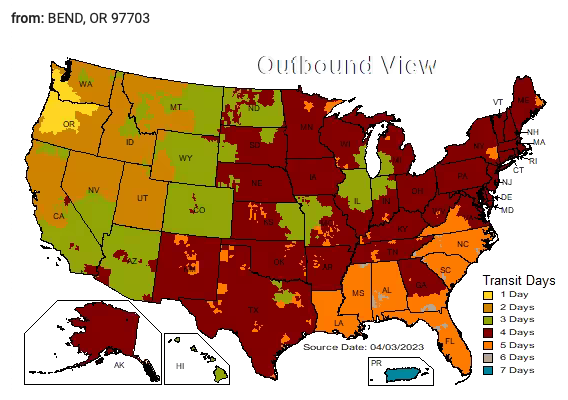
- Do you offer any paper/printing samples?
- Yes. We can mail you pre-designed printed pages, along with cover and case material samples. Contact customer care.
- Do you drop ship?
- Yes. We can ship orders directly to your clients. We do not include printed invoices with our packages. Simply select the shipping destination when placing your order.
- Can I use other programs such as Smart Albums to create my album layout?
- Yes. You may use other design programs to lay out a product design. However, you will need to take additional steps to ensure proper AsukaBook file setup.
- Can I order an unlimited amount of files per order?
- No. You can only upload a maximum of five files per order, but you may select an unlimited quantity of products per file.
- Does AsukaBook review my files?
- When placing your order, you will agree that you have reviewed your file(s) and they are ready for print, and by doing so, you take full responsibility for the layout and content. However, to help ensure you get the best possible product, we review all AsukaBook orders within two business days for noticeable layout concerns, but we do not check for spelling errors, design, image quality, or color choices. If any layout concerns are found, an AsukaBook representative will contact you with the option to resubmit a revised file, print "as is," or cancel and place a new order.
- What is the difference between pages and sides?
- A page has two sides. A 100 sided book has 50 physical pages.
- How can I be sure that the color AsukaBook prints matches what I see on my monitor?
- To ensure that the colors you see on your monitor will closely match the printed product, it is essential to have a properly calibrated monitor and to soft proof your finished designs with the AsukaBook printer profile. Learn more.